
Staff Member Skills Tab – Viewing existing records and audit history
The ‘Skills’ tab on staff member records is used for displaying the current ‘Skills’ and ‘Skill’ history of the employee. ‘Skills’ are used for various distinguishing factors within the system, for example, to confirm if an employee is qualified to work a selected role or to store a certificate/qualification such as a first-aid certificate. This function also allows the system to track any certificates that require renewal by looking at their end dates and reporting them in the ‘Skills Expiry’ ‘Smart Tile’.
‘Skills’ can be assigned to multiple staff members by using the ‘Clipboard’ functionality or by using the ‘Add Skill’ button on this tab where the start and end date of the ‘Skill’ and ‘Location’ (‘Site’ column) will be chosen.
Users will be able to view current or previous ‘Skills’ allocated to the staff member by opening the staff member record and selecting the ‘Skills’ tab. The ‘Skills’ will then display as per the screen shot below:
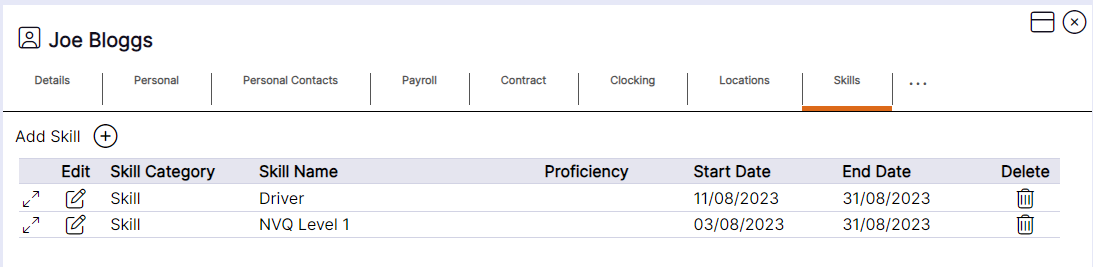
Skills’ will be displayed as per this example. The ‘Skill Category’ will always display as ‘Skill’, and the ‘Skill Name’ will display as per the stored ‘Skill’ record.
‘Skills’ can be deleted from the staff member record using the ‘X’ icon; however, it is NEXTRA’s recommendation that ‘Skills’ are NOT deleted for audit history purposes. If there is a change to a ‘Skill’ the start and end date should be amended. ‘Skills’ should only be deleted if they are added to a staff member in error.