
Creating new pattern groups
New ‘Pattern Groups’ can be created in the system using the following steps
Step 1- Select 'Rota Admin'
Step 2 - Select the ‘Pattern groups' tab.
Step 3 – Click on the orange cross in the bottom right hand corner to create a new pattern group
Step 4- Complete the details field
Owner- The location this pattern group should be available in. Only staff with access to this location or it’s sub-’Locations’ will be able to use it.
Group Name- Enter the name of the pattern group as you would like it to display in the ‘Admin’ screen on the ‘Shift Pattern’ management tab, and on the ‘Locations’ tab of the staff member record when staff have been assigned to this pattern group.
Shift pattern- Select the ‘Shift Pattern’ that staff who are assigned to this group will be working
Start Date- The date this pattern group is active from on i.e. If the Rota starts on a Monday and ends on a Sunday then the start date will need to be a date that is a Monday. If the rota starts on a Monday and a date is entered that isn't a Monday, this will cause the shift pattern to be applied incorrectly
Expiry Date- The date this pattern group will expire. I.e. This pattern will no longer be used in the business after this date. (Enter the date 31/12/2099 if there is no end date decided at this time).
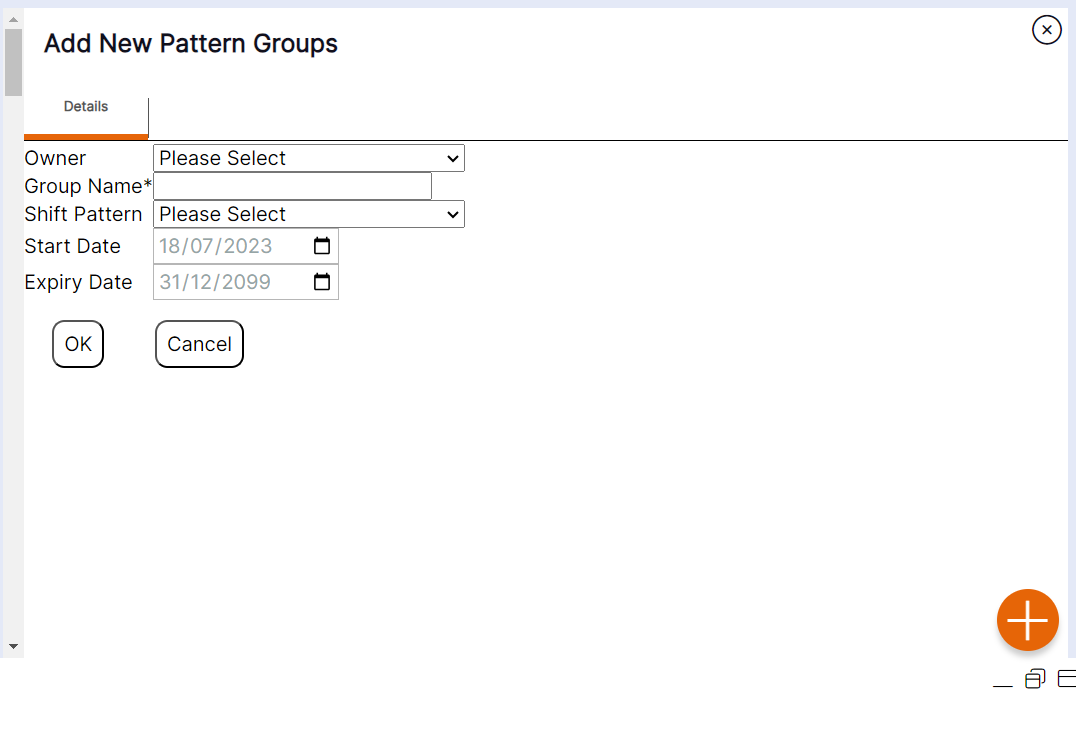
Step 5 – Select ‘OK’ to create the new Pattern Group.
HANDY HINT: When selecting the location of the ‘Pattern Group’, ensure you select the location at which the Pattern Group is relevant within the hierarchy. For example, if the pattern associated to this group could be worked by all staff in the business, you should assign the top-level location, so it appears for all users to amend, and as an option to assign to any staff within the business. Alternatively, if the pattern associated to this group would only be worked by staff in a particular department and also any staff within an area of that department, you should choose the department as its location, in order that it can be applied to staff on the rota within that department or any staff within an area owned by that department.