
Updating an existing record on the Holiday group Includes Tab of a Holiday group record
In order to edit an existing record, follow these steps:
Step 1 – Update the details by ticking and unticking the ‘Absence Types’ you wish the ‘Holiday Group’ rules to apply to.
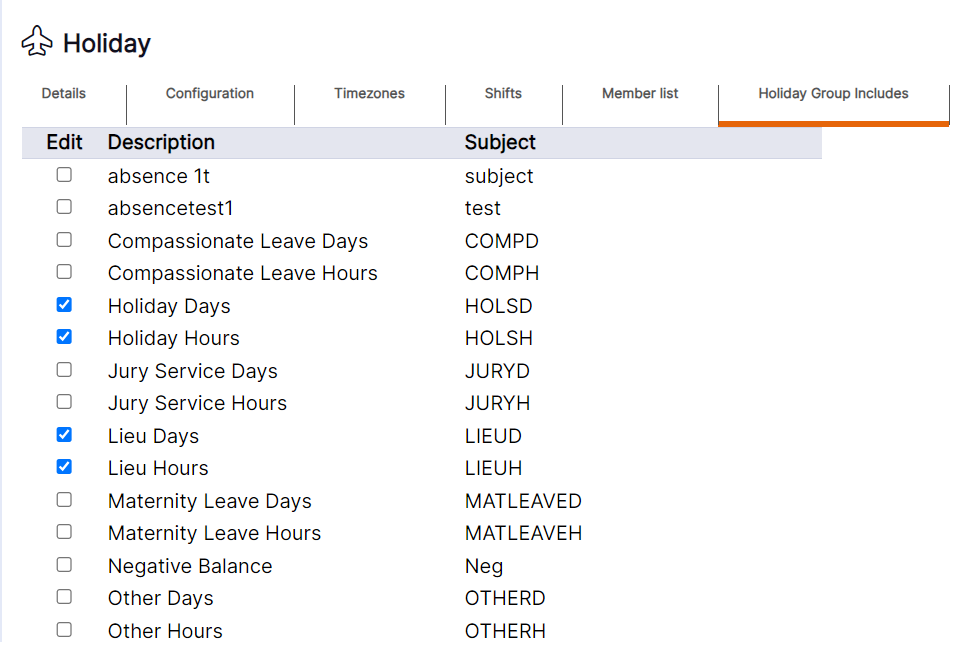
Step 2 – Select ‘OK’ to update the existing record.
HANDY HINT: Amending the ‘Absence Types’ selected on this tab will not update existing bookings. The amendments will only apply to any new absences booked after this change has been made.
WORKING EXAMPLE: If the ‘Holiday Group’ has been configured to allow 3 members of staff off on absence on any one day, and the only ‘Absence Type’ ticked on this tab is ‘Holiday Days’, if one staff member was to make an absence booking of ‘Holiday Days’ this would count toward 1 slot being used for the day. If another staff member was booked on sickness on the same day, this would not count towards one of the 3 slots for the day as the ‘Absence Type’ of ‘Sickness’ is not selected on this tab.